Showing posts with label DIY. Show all posts

8.29.2014

Capture Your Days || Step Four: Choose your End Product


What will you do with your pictures and words? It would be a shame to spend a day taking notes and photos without recording these in some tangible way. Having your end goal in mind is helpful when deciding your timing, camera and notebook. Perhaps this post should have been first in this series. My end goal almost always determines which camera and which day I choose for a session.

Some recording options include:
- Social Media (Instagram, Facebook, Twitter, etc)
- Blog Post
- Photo Album (photobook or scrapbook)

My first session was posted on Instagram live. I have since done a few on Instagram and on this blog. I enjoy the live feedback from Instagram but prefer the quality of photos taken with my DSLR. Each has a very different tone: The iPhone/ Instagram posts are picture heavy with very few words; I tend to focus on a theme like "hands." The DSLR/ blog posts are higher quality pictures curated from a large group of photos with words detailing our activities in a fuller, more journalistic narrative.

Whatever your end product is, be sure that you edit your work. 

Curate your photos to the ones that best tell the story of your day. 
I chose to use a photo highlighting one of August's toys rather than an adorable, smiley picture of August in an oversized chair. The abandoned toy on the floor tells a better story than the posed picture of my son. I had a nice posed photo of Brandon and August when Brandon came home from work. I opted for the picture of the dump truck ride instead. I love the posed pictures and they will be in our photo albums but not as a part of our Capture the Day session.

Refine your words to tell a compelling story.
I made Brandon read my recent session post to be sure it was interesting. I want to write our story in a way that honors the details of a life lived well. These mundane, ordinary days are very important to our development as a family. Our story deserves to be told in an engaging manner. When you edit your notes, write your story in a way that highlights its importance to you and your family.  

Thanks for following along with this series. Please let me know if you have ideas to share or any questions. 


To view all of the posts in this series, click here.

8.22.2014

Capture Your Days || Step Three: Choose your Notebook


Choosing a medium for note-taking is important. You will want to keep them all in one place so they are easy to locate when you are ready to compile and curate your documented day. You can jot notes throughout the day in a designated notebook or in a notes app on your phone. Even non-smart phones normally have a notes app of some sort. (I use the Simple Note app for iPhone.)

Journaling tips:
Take quick notes throughout the day when you take a picture, change an activity or every hour, on the hour. In the moment, just write enough to remember the details. You will edit and elaborate these notes at a later time. I recommend editing your notes within a week of doing a Capture the Day session. You don't want too much time to pass if your note-taking was in shorthand. 

Here is an example from my notes during our summer session:
Unedited
1:30 pm: lunch of last night's leftovers. greek chicken on pita wtih cucumbers tomatoes and peppers. iced coffee and chatter with Mum. 
2 pm: Play on living room floor. Mum brought pics so we look and talk about New York. August cranky while playing in space mobile.
Edited
1:30 pm: Mum joins us for lunch of last night's leftovers: Greek chicken on pita with cucumbers, tomatoes and peppers.  
2 pm: We dessert on iced coffee and visit for a bit while August plays with blocks and his spaceship. Mum brought pictures of August on the MG so we look and talk about her upcoming trip to New York for Rutledge's wedding. He gets cranky for a nap. 

The edited version is not longer but it is easier to read complete sentences with proper punctuation.


To view all of the posts in this series, click here.

8.15.2014

Capture Your Days || Step Two: Choose your Camera


Pick your Camera
Decide which camera you want to use. Any camera will work, of course, but keep your end goal in mind. If you want to share your pictures on your favorite social media platform, use your phone camera so you can quickly edit and upload during the day. If you want high quality images to turn into a photo book or print for a scrapbook, pick up your digital camera (point-and-shoot or DSLR). If you enjoy shooting with your film camera but don't pick it up often enough, this is your chance. These sessions are as much about stretching ourselves as they are about memory keeping. 

You can use different cameras throughout the day, but I find it is best to stick with one designated camera. Each camera produces a different type of photo, and I want my session to have a cohesive feel.

Take Pictures
It is easy to get in a picture-taking rut. Here are a few ideas for different, creative pictures:
- Please get in the pictures with your family. I am so passionate about this- our kids need to see the way we smile, the way our eyes light up in their presence. They need our joy to be captured and reflected upon in the future. Embrace the camera! (For more information and tips, read this.)
- Take pictures of your children (duh)
- Take pictures of things, especially rituals. Do you make coffee every morning? Snap a picture. Do you restack the board books every night before bedtime? Grab your camera. Is your counter lined with drying baby bottles? Document it.
- Play with angles. Stoop low to your child's eye level. Stand on top of a chair to get the bird's eye view. Tilt your camera on an angle so your subject is diagonal.

- Hold up an ordinary, everyday object against your wall (coffee cup, toy, car keys, pruning shears, favorite book)


I am always looking for a new way to view the ordinary. Please share your favorite camera perspectives with us in the comments section.

To view all of the posts in this series, click here.

8.08.2014

Capture Your Days || Step One: Choose your Timing


Pick your Day
The first Capture the Day session I undertook was my first Mother's Day (2013). The second session was Thanksgiving 2013. The third and subsequent sessions have been on random, ordinary days. Whether you choose a special day or an ordinary one is irrelevant. I recommend choosing a day when your activities will be conducive to cameras and small moments for journalling. Perhaps a day at a water park or on the beach or snow skiing is not the best day to lug a camera around with you. I also like to pick a day that doesn't involve a lot of errands since I'd likely forget to take pictures while grocery shopping. Don't let that stop you though! I bet kids loaded in a grocery cart amongst cereal and vegetables would be an amazing memory to capture. 

Decide your Time Increments
You will want to divide your day in different increments. I prefer hourly or morning, afternoon, evening. If you choose hourly, you could note the specific time (ie- 4:09 am) or just the hour range (ie- 4-5 am). Morning, afternoon, evening is a great way to document the overall tone of your day. I think this method works really well if you do an activity (ie- homeschool, soccer games) for several hours in a row. The practicality of the day's events help determine which increments of time you should choose. 


There is not often a rhyme or reason to when I choose to do a Capture the Day session. I take things one hour at a time because the clock is a great reminder for me to check in. Every hour I try to take notes. Each time our activity changes, I snap some pictures. At the end of the day, I have a full camera card and small details journaled and ready to be edited. 

To view all of the posts in this series, click here.

8.07.2014

Capture Your Days || Introduction

Recently, I shared one of our Capture the Day sessions and it occurred to me that a short series on the subject might be nice. I have said this before: we are the memory keepers for our families. When I was younger, my mother recorded a cassette tape of my brothers' conversations. Sadly, the tape has since been lost, but the idea inspires me. Wouldn't you like to know what you did during a normal day from your childhood? Let's do this for ourselves and for our children.

It occurs to me that all of my memory keeping (photography and journaling) is 100% from my perspective. When August looks back on his life, he will see his father's perspective in short films and my perspective in our family albums. When August is older, I hope to have him journal a "day in the life" feature. I hope I remember that idea years from now. If any of you try this with your older children, please share a link to your results in the comments.

Because we are more likely to remember (and photograph) special days, normal ones need documenting too. If you are interested in doing your own #capturetheday session, I highly recommend it. The key is to just start: start snapping and start writing. I've done this on special days and on ordinary days. Pick a day and start. Hopefully, you will find great beauty within the mundane routine of your day.

Starting tomorrow, I will be breaking down each step over the next month. Here is what you can look forward to-

Step One: Choose your timing
Step Two: Choose your camera
Step Three: Choose your notebook
Step Four: Choose your end product


7.18.2014

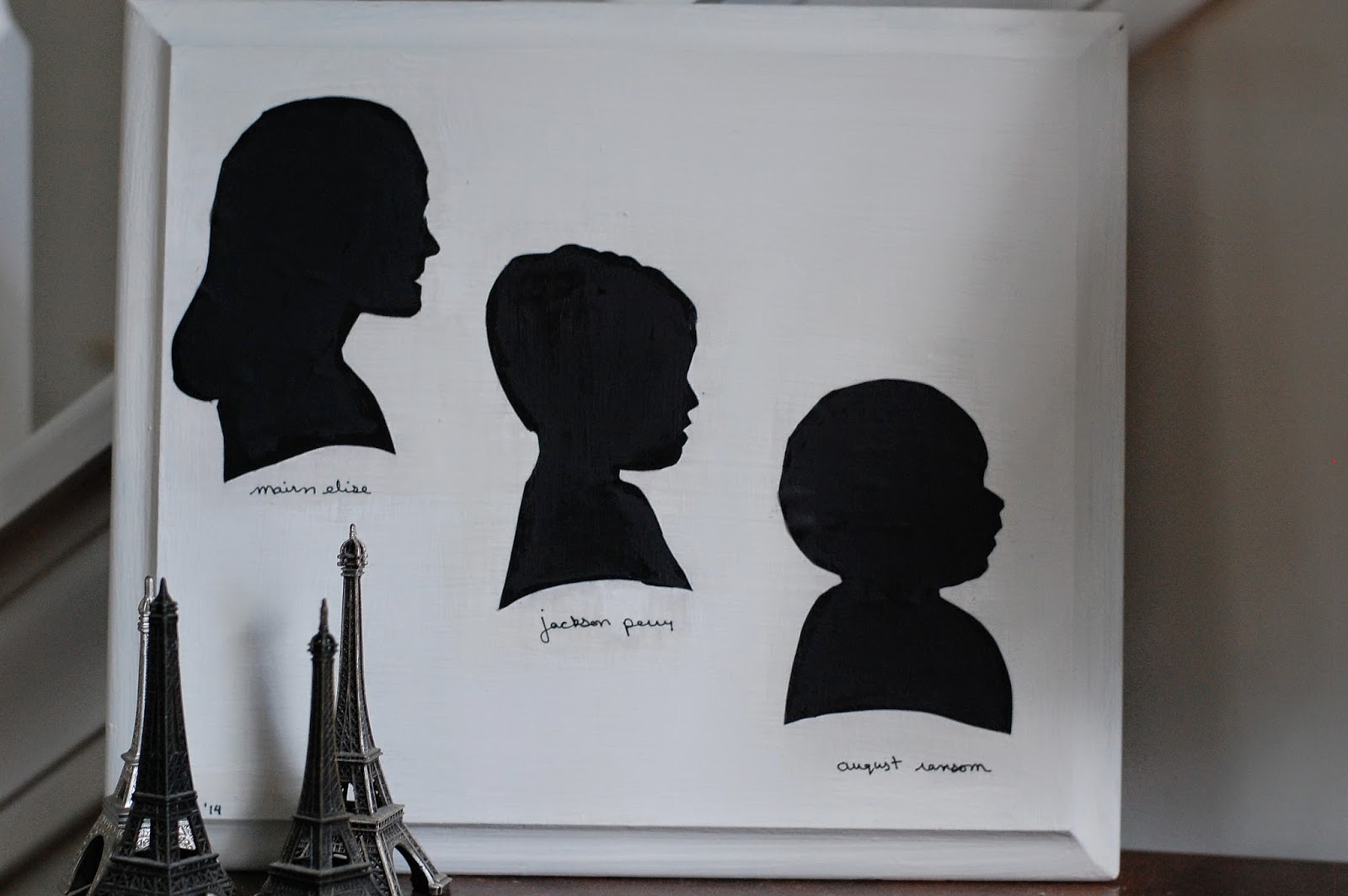
DIY Painted Silhouettes on Wood

With Father's Day approaching last month, I knew I wanted to give my dad something classic. He does not like a lot of stuff but does enjoy pictures from his childhood and of the grandchildren; I also wanted to create something unimposing that fit within my mum's decor style. Silhouettes capture childhood innocence in a traditional art format- exactly the balance I was searching for. 

Here is how I created and mounted the silhouettes on wood:

Supplies:
paper (preferably cardstock or heavier-than-normal printer paper; I used resume paper)

black paint
white paint
Mod Podge or other adhesive
wooden board

Tools:
foam brush

old paint brush (for Mod Podge application)
printer

1. Make the silhouette

a. Print a photo of your subject on paper (not photo paper). Be sure to size the image to the desired size for your board before printing.
b. Use an x-acto knife to cut out the subject. Be careful around the face.
c. Grab your foam brush and brush paint onto the surface of your paper. Cover the entire paper. Allow the paint to dry and apply a second coat.

2. Paint the board
Take your wooden board and paint the front, back and sides. You may need more than one coat. 
*Because I wanted a smooth surface, I bought my wooden board at a thrift store instead of using my stash of reclaimed wood. The board had a country feel: a scene of some ducks and a quote about home. I was attracted to the nice edge of the board. You can use any wood for this just be sure the surface is smooth. 

3. Adhere the silhouette
Allow the paint on the silhouette and the board to dry completely. 
a. Paint the back of your silhouette with a thin layer Mod Podge, making sure you hit the edges. 
b. Adhere the silhouette to the board carefully. Using firm pressure, wipe your fingers towards the edges to be sure you eliminate any bubbles that have formed. (I ended up with a few because I was not working fast enough.) Allow to dry.
c. Write the name of your subject and sign your art
d. Apply a thin coat of Mod Podge to the entire wooden board, painting over the silhouette. This seals the silhouette from damage. Be sure to apply it to the entire board as this will sightly alter the final color of your background. 
*If the Mod Podge discolors your silhouette, use a thin paintbrush to apply black paint on the silhouette. 


Silhouettes are so simple and easily adaptable. Make these more contemporary by changing up the paint colors to fit your style. Swap out the black paint for gold or the white paint for grey. Try bright colors for a children's room. Pick your subject and paint colors and start painting.


6.23.2014

A Yellow-toned Shower for Baby Girl


In early May, several women and I threw a baby shower for our good friend Patricia. She is expecting a baby girl in mid-August. Friends and family gathered for light snacks, summer sangria and petit fours in an old parlor of downtown home. Activity stations were placed throughout the area for guests to guess the birth date, make a custom onesie, select a prayer for the family and leave some advice for the new parents. Sims (who has recently moved to San Diego and had a baby girl of her own- beautiful Annie) and I were in charge of decorations and flowers. We had a lot of fun scheming and playing with her grandmother's china and crystal. We love Baby Girl already, Patricia, and I cannot wait to hold her!


6.16.2014

DIY Big Phrase Art on Wooden Panel

Deuteronomy 6: 6-9 Write these commandments that I’ve given you today on your hearts. Get them inside of you and then get them inside your children. Talk about them wherever you are, sitting at home or walking in the street; talk about them from the time you get up in the morning to when you fall into bed at night. Tie them on your hands and foreheads as a reminder; inscribe them on the doorposts of your homes and on your city gates. (The Message)
I doubt the Historic Society would appreciate it if I painted Scripture on the gates of downtown Charleston. I doubt I would read the words if they were on the doorframe of my front door (since I rarely use it). But I do not doubt the wisdom in surrounding ourselves with Scripture to help the words sink deep within us. 

I am in love with any handwritten lettering especially when it is turned into BIG art. I made this one for August's nursery last year and have been wanting to do something ever since. Inspired* by this incredible sign, I decided to use the same idea to make Scripture art for the home. 

Supplies:
wooden panel (any size)
white paint
black paint
2-3" paint brush
small (¼") paint brush, angled if possible
pencil

1. Select your scripture or phrase. (Mine is Psalm 16:6)

2. Paint front, sides and back of wooden board with white paint. You will likely need two coats for the front of your board.
3. While that is drying, plan out your phrase on scrap paper. My phrase has 39 letters and my board fit 6 letters across. I did not want spaces between words and I knew I wanted seven rows of script so I adjusted the letter height accordingly. 
4. After the white paint is completely dry, pencil in your letters. 
5. (Optional) I wanted a practice run with a lighter paint so I selected a thin paintbrush and did a quick trace of the pencilled letters.
6. Starting with your middle row and using your angled brush, trace your letters with black paint. Work your way down and up from the middle row to ensure the bottom of your art is not too crowded or too spacey. The black paint will be much thicker than your pencil strokes so be sure to step back and keep an eye on the whole board.

7. Wipe most of the paint out of your brush on your palette. When the letters are mostly dry, retrace the letters to smear a bit of the paint and achieve the handwritten, less perfect look.

8. Attach a ribbon or wire with staples or hooks for hanging. Or prop it on a table or bookshelf.

Note: It is a good idea to use a sealant to prevent damage to your sign, especially if it will be outside.


Of course, this would be a fun DIY with any phrase. Try it for your favorite song lyrics, wedding vows, movie quotes, pet names. Limitless possibilities! I think I'll try white paint on black poster board next.

If you try this, let me know! I'd love to hear what kinds of phrases you use.


[*Please note: Originality in art is important to me. I am by no means trying to steal or discredit the creativity and art of The House of Belonging. I am receiving no monetary gain from this post.]

5.16.2014

How-To Send Your Child to Space || A Brandon Loy Tutorial

Brandon is guest posting today with a special feature for us: How-To Send Your Child to Space Using only Household Items, an iPhone and iMovie. He actually wrote this tutorial for a job interview last August. He was supposed to give detailed instructions for a specific task. Most people wrote about tying shoe laces or saving a Word document. Brandon took a risk and wrote about something he loves; it paid off. 

---

You are about to learn how to send your child to space using only regular household items, an iPhone and iMovie. My four-month-old son has been on countless adventures, including visits to Tatooine, the Moon and the Mojave Desert. Before sending your child into the Great Unknown, first collect a few items from around your house.

1 lime or neon green sheet, blanket or curtain 
(Hint: Avoid dark green colors and jersey material.)
1 18x18 inch cardboard box
(This size is only a recommendation. Use any size you have on hand.)
Pen
Small Desk Lamp
iPhone

Step 1: Make sure your box has an open top and closed bottom. Take a pen and poke 40-50 holes randomly in the bottom of the box. The dots can be large or small. You have now created stars from outer space.

Step 2: Go to a dark room with your desk lamp, box and iPhone. Place the box on the floor with the opening of the box towards you.  Place the desk lamp on the other side of the box facing the bottom of the box. Turn the lamp on in the dark room and look into the opening of the box. Within the box, you should see the light from the desk lamp shining through the holes creating a star-filled sky. Take your iPhone and record a video of the light shining through the holes. (Be creative and move the camera around in the box to create different types of star patterns and movement.)

Step 3: Lay out the green sheet in a well-lit room. Be sure there are no wrinkles, marks or stains. (It is important that the sheet remain flat and unwrinkled during filming.)

Step 4: Place child in the center of the green sheet. Use your iPhone to film child from above on the green sheet.

Filming Tips:
- Film beside a window on a bright day to be sure your video is neither too shadowed or too harsh from direct sunlight. Since you are using an iPhone, lighting is key to quality videos.
- During filming, make sure your shadow is not seen in the video and that the green sheet takes up the entire screen. Also, have your child make funny faces and movements to make the adventure more exciting.
- Film as much footage of the child and the starry landscape that you want. I have learned that is it better to have more footage when it comes to the editing stage.

Step 5: Open iMovie and create a new project (To do this, click the PLUS sign in the middle of the program or select File > New Project).

Step 6: Plug your iPhone into your computer. Find the Event Library located on the bottom left of iMovie. To import your videos, right click anywhere in the Event Library box. Choose “Import Movies” then Create a New Event to add the videos from your phone.

You have done all of the set up, preparation and organization. Now begins the fun and creative part of the project: editing. Editing is the part of the process that sharpens, tweeks and cleans up the video footage while adding some extra bells and whistles (like outer space!) to your film.

Step 7: Locate the space footage in the Event Library that you recently imported. Use your mouse to highlight the length of the footage you want to enter into your final video. A yellow box will appear around the video indicating the exact amount of time to pull from the raw footage. Once you have allocated the proper amount of footage, drag the footage into the Project in the upper left screen.

You will notice your starry field footage will appear in the upper right hand corner.  Now it is time add your child into the open space.

Step 8: Locate the green sheet footage with your child in the Event Library. Use your mouse to highlight the length of the footage until it matches the length of the footage in Step 7.  Again a yellow box will appear around the video indicating the exact amount of time. Drag the footage on top of the footage present in the upper left screen. (You are dragging the child video on top of the space video.) Another box will appear with options; choose the “Green Screen” option.

The green will disappear and only your child among the stars should remain. You have now created a video of your child soaring through space.

Editing Tip:
-Feel free to play around with the settings to add some visual and sound effects. I personally recommend adding music, which will add some context to your story and production.

Step 9: You need to render your video. Simply locate the Share menu on the top of the screen. Click Share then Export Movie. You can name your movie and pick the export size. I recommend 960x540. Exporting the video should only take 5 to 10 minutes, depending on the length of the video.


Congratulations! You have created a video of your child flying through space. Learning green screen enables you to be creative with your family video collection. 

---

I sure am glad I am married to such a cool guy. If you want some inspiration, watch one of Brandon's green screen films here. Go make a movie with your family and friends this weekend; you won't regret it. If you do, let me know how it goes. Happy Friday!

4.30.2014

DIY Book Pages Hanging Pendant Lantern


Never one to waste effort or decorations, I knew I would reuse the circle banners from August's birthday somehow in our home. We left the banners and balloons hanging in our hallway for 3 weeks after the party until I came up with my idea: a Book Pages Hanging Pendant Lantern. (Also, the longest DIY name ever.)

Supplies:
an old book*
a hoop OR a piece of thin cardboard (around 12"x12")
string or fishing wire
a hook or thumb tack

Tools:
circle punch
sewing machine
hot glue gun

1. Make the circle banners
a. Use a circle punch to cut circles from a book or some other cute scrapbooking paper. Alternatively, you can cut the circles by hand by following a circle mold cut from cardboard. Keep cutting. You will want a lot of circles! (I cut around 250 for the party and used most of the banners for this project.)
b. Run each circle through the sewing machine, one after another, making your banners. Depending on the size you want your lantern, only sew between 10-15 circles together. Leave excess thread at the end of each banner.

2. Create the pendant
a. You can use a hoop from a craft store and skip to step 3
OR
b. Cut a piece of cardboard into a circle (like I did). My original idea was to use a hoop but I didn't want to run to the store. Instead, I traced a lampshade circle on a piece of cardboard.
b. After you cut out the circle, use a hole punch to create 3 holes evenly spaced around the edges. This is where we will tie the string to hang the lantern.

3. Fashion the lantern
a. Use your hot glue gun to adhere the banners to the cardboard circle or hoop. If you are using a hoop, glue the excess thread to the top and drape the banner over the outer edge. If you are using cardboard, glue the first circle in your banner to the top of the cardboard and drape the rest of the banner over the edge.
b. Optional: I had a lot of banners from the party and I wanted a really full lantern. If you do too, glue the first circle to the bottom of the cardboard so that the banner hangs in the middle of your lantern. Space evenly throughout so your lantern is level.

4. Hang the lantern
a. Tie your string or wire through the holes or around the hoop in 3 locations. Gather your strings together and tie so your lantern is level.
b. Hang from a hook or with a thumb tack. Stand back and fall in love with your new lantern.


*A note on using books in crafts: My mother-in-law was (justifiably) surprised that I was tearing and cutting up books for August's birthday party. For this project, I used a really old travel book that was no longer accurate. Also, if a book is too dirty to be handled by children, I do not mind using it for a craft project. (Think of pages eaten up by little animals and other unpleasant things that happen after years of sitting in an attic.) Instead of throwing away a book like that, I try to keep it with my art supplies to use for these types of projects.


Fun fact: Mum and I used an old, dirty book of Shakespeare to package purchases from our Etsy shop. We'd make the huge pages into envelopes; somehow it felt like we were secreting a censored book to our customers. Have you read the Book Thief? It will make you never want to throw a book away again!

Thanks for reading my first DIY post! What did you think? Would you like more DIY projects from the Loy household?